Samsung’s Chromebooks have always been notorious pieces of hardware that have somewhat been held back by an uninspired operating system and price that are sometimes too expensive. Given the hindrances of Google’s Chrome OS, the Chromebook is better off as a secondary computer. But, having a secondary computer is a luxury most of us will find difficult spending $600+ on. The Samsung Chromebook 3 XE500C13-K06US fits that role, offering better performance than a cheap noteboook.
The new Chromebook 3 is a refreshed upgrade over the Samsung Chromebook 2, and like its predecessor, it starts at the typical entry-level Chrombook price. This Cortex-based machine features long battery life and a crisp, lightweight design. Did Samsung finally deliver a perfect Chromebook?
More: The Best Laptops for Under $500
Samsung Chromebook 3 design
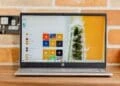
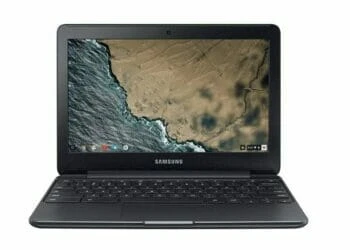
Like the previous Chromebooks made by Samsung, the XE500C13-K06US is a nice piece of hardware. Light. Slim. With ultrabook aesthetic. Though it’s not made of premium materials, it still feels sturdy all over. If not for the chrome label on the lid, you’d easily mistake this Chromebook for one of Samsung’s Windows laptops. In fact, if you’re not careful, you might mistake it for an expensive ultrabook.
Design-wise, the 11.6-inch Chromebook 3 is identical to the Samsung Chromebook 3 (XE500C13-K04US) that Samsung released last summer. This time around, the company brought forward what worked with the previous design and fiddled a bit with storage size.
Samsung Chromebook 3 ports
On the Samsung Chromebook 3 XE500C13-K06US, you’ll find most of the ports you need. The left side has a battery indicator, a battery indicator, a slim jack for the AC adapter, a USB 2.0 port, a full-size HDMI and a MicroSD card slot. On the right side, there’s a USB 3.0 port, as well as a combination audio and microphone jack.
You don’t get a USB-C port here, that’s perfectly OK, since you probably won’t use the port much anyway. The MicroSD slot allows you to supplement the system’s 64GB on-board storage with more space, but we’d prefer a full-size SD slot here, just like other Chromebooks. This is the same port options available on the budget Samsung XE500C13-K03US.

Display
The 11.6-inch display’s resolution maxes at 1366 x 768 – lower than that of the ASUS C302CA-DHM4, though that Chromebook also has a bigger screen. A matte display would be better for wide viewing angles and better visibility in the sun, this one is not as bright as we’d like. Colors are vibrant but its dim and black levels are not very deep.
That being said, the Chromebook offers a decent video-watching experience in both bright light and dim surroundings thanks to the wide viewing angles. Audio isn’t that strong, though. The bottom firing speakers produce fairly muffled sound, unless the laptop is sitting on a flat surface.
Keyboard
The Samsung XE500C13-K06US uses a spill-resistant keyboard, which is comfortable to use with slightly curved profile to fit your fingerprints’ profile. With 1.2 millimeters key travel, you’ll be able to accurately type without much hiccups. About the only gripe with the keyboard is the layout. I wish it would use more distance between the power button and the rest of the keyboard.
The touchpad measures 3.9 by 2.2 inches, which is a good size for an 11-inch device. It has a cool, smooth feel, and responds to light tapping than you’d experience on most devices.
Performance
One of the reasons the Samsung Chromebook 3 XE500C13-K06US is that it runs on a 1.6 GHz Intel Celeron N3060, Intel HD Graphics 400, 4GB of RAM and 64GB of eMMC flash storage, which is double the 32GB eMMC you get on budget Chromebooks. The on-board memory is mostly used for browser cache but also for documents, music and other files that may need to be stored offline. Since Chrome OS is basically just a browser that lets you use google docs, it doesn’t require heavy resources .
This Chromebook suffices for daily productivity, especially college tasks that are not resource intensive. It doesn’t feel sluggish when performing basic tasks. This include writing emails while streaming your favorite music, surfing on Facebook, or doing some We browsing in another tab. Also, it handles a few browser-based games fairly well since most of your personal information is stored on Google Drive.
More: Top 10 Laptops for College Students
Battery Life
There are 39 watt-hours of battery capacity tucked away inside the Samsung Chromebook 3 XE500C13-K06US chassis. On paper, that’s not a lot of juice, but Chrome OS devices usually get great battery life, and the Celeron processor isn’t all that demanding. So, don’t be surprised when this Chromebook proves itself to be an all-day performer away from a plug.
Overall, you’re definitely getting through your obligatory eight-hour workday on a single charge. With 10 hours 44 minutes of battery life on a single charge, this remains to be an excellent all-day productivity machine.

The Samsung Chromebook 3 XE500C13-K06US sports a solid build, improved battery life and good performance for an 11.6-inch laptop, making it a solid entry into the now-crowded sub-$300 Chromebook market.
Is there a better alternative?
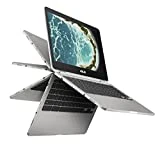
You can spend around $150 more and score the ASUS C302CA-DHM4 Chromebook Flip, with a 12.5-inch touchscreen. It sports an all-metal body, 4GB of RAM, 64GB flash storage and modern connectivity including USB Type-C. With an Intel Core m3 processor, it stands out as a significantly faster machine with a more productivity form factor, and that makes it a more viable choice.
Should you buy it?
Yes. There are many compelling reasons to choose the Samsung Chromebook 3 XE500C13-K06US over its closet rivals. It offers a sleek design, excellent battery life and rings a very affordable price, that’s cheaper than what you’d spend on a smartphone nowadays.
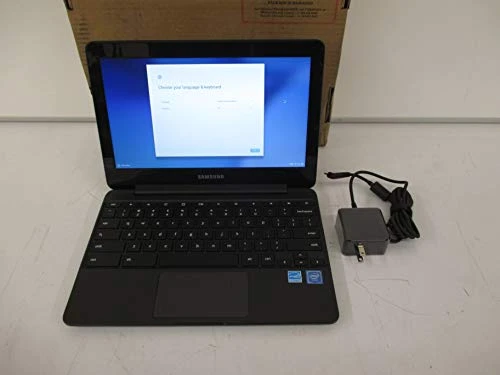
Samsung Chromebook 3, 11.6", 4GB Ram, 64GB eMMC (XE500C13-K06US)
3 used from $89.99
The Review
Samsung Chromebook 3 XE500C13-K06US
The Samsung Chromebook 3 XE500C13-K06US sports a solid build, improved battery life and good performance for an 11.6-inch laptop, making it a solid entry into the now-crowded sub-$300 Chromebook market.
PROS
- Bright, accurate screen
- Superb battery life
- Strong performance
CONS
- Mediocre speakers
- Display is dim
Review Breakdown
-
EDITORS RATING