

The Sceptre E248W-1920R is an affordable 24-inch Full HD (1,920-by-1,080) monitor designed for users who spend equal amounts of time working and playing casual games on a desktop PC. It uses a Twisted-Nematic (TN) panel, which isn’t as bright as an In-Plane Switching (IPS) panel, albeit delivers rich, accurate colors and a sleek metal design for the price.
For seasoned gamers, anything with a 75Hz refresh rate isn’t something you can consider for modern titles, but for the budding gamers on a tight budget and enthusiast media editors, the E248W-1920R will keep you going, at least for now.
Design
With its slim-bezel borders and silver metallic cabinet, the Sceptre E248W-1920R will look good on any desktop. In fact, it’s the first monitor we’re seeing at this price range sporting a metallic design, some costing almost double still ring the dated plastics. The cabinet is supported by a stand consisting of a trapezoid-shaped base, which has a docking point to rest your keyboard.
The 24-inch TN panel has a resolution of 1920 by 1080 and a 16:9 aspect ratio, which means it can display a full HD (1080p) video. Other features include a 5-microsecond gray-to-gray (G-to-G) Response Time, 230 cd/m2 peak brightness, and a 5,000:1 dynamic contrast ratio; all of which are at par with most budget monitors.
 Performance
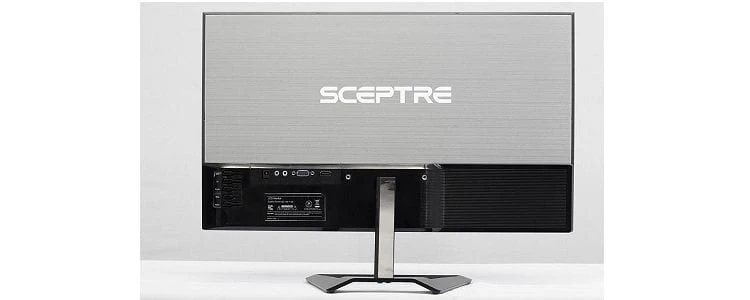
On the back, there are five small function buttons. Including the power switch with white labeling, located near the right bezel when looked at from the front side. The design makes the buttons easy to identify, but you’ll have a hard time using them when the monitor is mounted on a wall using the VESA mount. The stand doesn’t allow for height or swivel adjustment, nor can you pivot it for portrait mode viewing.
Also, on the rear of the cabinet are VGA and HDMI ports, a headphone jack, and an AC power jack. The On-screen menu offers a nice selection of picture settings, although it doesn’t give you advanced six-color adjustments that you get in more expensive gaming monitors like the Asus ROG Swift PG258Q. For the adjustments, the Standard setting gives the best overall picture, since the rest of the options are either too dark or overly bright.
 Gaming Performance
The Sceptre E248W-1920R’s out-of-the-box color accuracy is good, but not the best. If you go into details, you’ll realize that red and green colors may be somewhat misaligned with their ideal coordinates, that when using a display rendering software, but for the plain eye it looks just OK. Nevertheless, the panel produces rich, well-saturated colors, and in testing, it displayed scenes from Damien Chazelle’s La La Land on Blu-ray nicely.
Gray-scale performance is also good; although it doesn’t manage the same detail that you’ll get from high-end IPS panels, such as the one used on the BenQ BL2420PT. Viewing-angles are good (not the best, though) for a 24-inch monitor, with little color shifting when viewed from any angle.
The panel does a good job at displaying fast-moving items, though you’ll get some lag in modern games at high resolutions. Input lag (the amount of time it takes for the monitor to react to a controller command) came in at an impressive 13.7 milliseconds, which is not far apart from the competition.
For gamers, the panel’s 5-millisecond (gray-to-gray) pixel response and 75Hz peak refresh rate won’t suffice for many games, but it isn’t the worst either. I noticed screen tearing while playing GTA V on the PC and while playing Fallout on the XBOX 360. Many gamers will be hard-pressed to find graphic solutions to handle 5K gaming, especially with the release of the Pascal-based NVidia GeForce GTX 1080 Ti graphic cards. If you need to enjoy smooth gaming, the Acer Predator XB271HK offers a few nice features that will appeal to gamers.
The panel’s 12.8-millisecond input lag (time taken for the monitor to react to a controller command) is fairly short, though it doesn’t beat the 10.6-millisecond standard for most budget monitors. The fastest we’ve had so far is 9.5 milliseconds from the Benq SW2700PT. The monitor consumes about 37 watts of power while setting to Text mode and 33 watts while set to Movie mode and a paltry 32.7 watts in Power Save mode.
Verdict
The E248W-1920R is an excellent choice for buyers on a budget seeking a medium-size display that offers solid performance at a reasonable price. Its thin-bezel metallic design delivers a seamless viewing area that even permits for two or more monitors to be positioned side by side. If all you’re looking for is an affordable, well-designed 24-inch monitor, then this Sceptre passes as a good choice.
Granted, you’re not expecting tons of features including USB ports, and DisplayPort inputs, and it also comes short of a fully adjustable stand. Still, it does a good job of delivering solid colors and nicely rendered gray-scale performance, and it easily fits into your budget. If you work with photos and require more color control, consider our Editors’ Choice, the LG 32MA70HY-P, an extra-large screen monitor with accurate colors and advanced controls.
The Review
Sceptre E248W-1920R
The Sceptre E248W-1920R is a stylish, inexpensive 24-inch monitor that delivers vibrant colors and solid grayscale performance. However, it falls short of features such as DisplayPort connectivity and an adjustable stand but offers a nice feature set for the price.
PROS
- High contrast ratio
- FreeSync up to 75Hz
- Two HDMI ports, built-in speakers
CONS
- Tilt-only stand
- Minor ghosting in fast-paced games
Review Breakdown
-
EDITORS RATING