
Pockeit
TRENDING
  • Home
  • Best Deals
  • Explore
  • Desktops
  • Laptops
  • Trending
  • Best Picks
  • Reviews
No Result
View All Result
  • Home
  • Deals
  • Reviews
  • Laptops
  • Desktops
  • Monitors
  • Phones
  • TVS
  • Best Picks
  • More
    • Appliances
    • Explore
    • How-To
    • Network
    • Printers
    • Soundbars
    • Trending
  • Home
  • Deals
  • Reviews
  • Laptops
  • Desktops
  • Monitors
  • Phones
  • TVS
  • Best Picks
  • More
    • Appliances
    • Explore
    • How-To
    • Network
    • Printers
    • Soundbars
    • Trending
No Result
View All Result
Pockeit
No Result
View All Result
Home Reviews Laptops College Laptops

ASUS S400CA Review

by
January 22, 2024
in College Laptops
ASUS-S400CA

Windows 10 works best with touch, and the ASUS S400CA brings that experience to the masses for a relatively wallet-friendly sticker price. This 14-inch Ultrabook features a touchscreen display along with a solid array of components, spearheaded by a Core i5 CPU, 4GB of RAM and a 500GB hard drive with a 24GB SSD as a fast-booting sidekick.

Equipped with the practically generation-standard 1.7GHz Intel Core i5-3317 processor, as seen in many other ultrabooks, along with its Intel HD 4000 integrated graphics, the VivoBook S400CA hardly surprises.

It performs about as well as any of the other laptops we’ve seen, handling applications well and running games reasonably effectively, too, provided they’re not graphics barnburners. That’s good news, because it means the VivoBook performs well enough to do almost anything you’d expect out from a basic laptop.

Design

At 13.3 x 9.4 x 0.8 inches and 4 pounds, the ASUS S400CA is lighter and a little shorter than both the HP ENVY TouchSmart 4 (4.6 pounds, 13.5 x 9.3 x 0.9 inches) and the Acer Aspire M5-583P-9688 (5.3-pounds, 13.4 x 9.6 x 0.9-inches). The ASUS is also more portable than the Toshiba Satellite P845t (4.8 pounds, 13.7 x 9.2 x .95-1.14 inches).

To be fair, among these systems, only the HP lacks an optical drive like the ASUS does, but the S400c still deserves kudos for being the lightest and thinnest 14-incher with touch around. And it’s that thin without feeling the least bit flimsy.
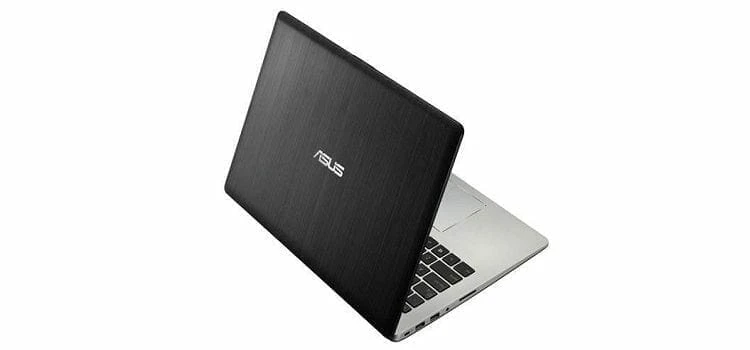
ASUS S400CA

The ASUS S400CA looks like a standard 14-inch laptop, with a 1,366 by 768 resolution touch screen. It has a dark brushed metal lid, and a matte silver keyboard deck. The Windows 10 Start screen is snappy whether you use the touch screen or the trackpad, but it’s much more intuitive with the touch screen.

That screen is bright and clear. Screen viewing angles on the LCD screen aren’t quite as wide as they would be on a system with a more expensive IPS panel, but they are sufficient for a single user.

Some critics will call out that the 1,366-by-768 screen isn’t full 1080p HD resolution, but 1,366 by 768 is sufficient for use with today’s apps and websites, and the lower resolution makes text larger and easier to read without having to use glasses. 1080p videos scaled down to fit the 720p screen played just as smoothly as they would on true 1080p laptops.

Connectivity and Features

Asus took advantage of the Asus S400CA’s above-average thickness to stuff it with more ports than the typical ultrabook. The left side of the laptop boasts a Kensington lock slot, a pair of USB 2.0 ports, a combination headset and microphone jack, and an SD card reader, while the right side rocks a speedier USB 3.0 port, HDMI and VGA connections, and an Ethernet port. As is usual with ultraportables, there’s no optical drive.

The full-sized black chiclet keyboard isn’t backlit, but is comfortable to type on. One other minor nit while we’re at it: Conventional wisdom dictates that the row of function keys above the keyboard should work first for their primary function (volume, screen brightness, sleep, etc.), then F1-F12 after you hold down the Fn key. On the VivoBook S400CA, you need to hold the Fn key to use the primary functions.

It’s not a deal breaker, but it’s counter-intuitive, like having to hold down the shift key to type lower case letters. Otherwise, the rest of the keys are where you’d expect them to be, plus the system doesn’t have miniature arrow keys, as on the non-touch ultrabook in the same price class, the Acer Aspire S3-391-6046.

Speakers on the ASUS S400CA which are embedded with a SonicMaster HD codec along with Waves Maxx audio 3, nest on the edges of the underside. They also get a software-based boost from AudioWizard, which can be found in the ASUS VivoBook tile. When we listened to “Need You Tonight” by INXS and “Orange Crush” by R.E.M, the sound seemed somewhat hollow. The speakers don’t handle heavily distorted guitars or bass drums well. 

Performance

The ASUS S400CA comes with a 3rd-generation Intel Core i5-3317U processor, Intel HD Graphics 4000, 4GB of memory, and a 500GB hard drive with 24GB caching mSATA SSD. The SSD lets you boot the VivoBook from a power off to the Start screen in about 12 seconds, which is likely much faster than the laptop or desktop you’re replacing.

Waking from sleep mode only takes a few seconds. You wouldn’t expect great performance in a less expensive system, but in this case you’d be wrong. The VivoBook’s Core i5-3317U processor is the same one we’ve seen in systems costing over $1,000, so the VivoBook made a great showing at our benchmark tests.

We did a Photoshop CS6 test (photo manipulation and editing) and it didn’t disappoint with budget class performance. About the only test it doesn’t run away with is the battery rundown test: the VivoBook just tops four hours (4:18), while other systems like the Acer Aspire S3-391-6046 almost makes it to five (4:47). Granted, the Acer Aspire S3 doesn’t have a touch screen to draw power.

Bottom Line

Compared to other laptops, the ASUS VivoBook S400CA comes in with great bang for the buck due to its high-performance processor, large amount of storage, touch screen, and above all a nice price. While it doesn’t have the battery life (or pricing) to unseat our budget laptop Editors’ Choice, the Acer Aspire 5 A515-46-R3UB, the VivoBook S400CA certainly has the muscle to become deliver on your daily computing needs and a great Windows 10 touch experience.

At the entry level, the Asus simply gives users what they need for a better Windows 10 (free upgrade) experience, at a reasonable price.
Related Posts

Best Laptops Under 500
Budget Laptops

Acer Chromebook CB3-131-C3SZ Review

Samsung-Chromebook-3-XE500C13-K02US
Budget Laptops

Samsung Chromebook 3 XE500C13-K02US Review

Toshiba Satellite C55-B5100
College Laptops

Toshiba Satellite C55-B5100 Review

The Hp 15-r137wm strikes a delicate balance between, design, mobility, performance and productivity. The mid-range priced Notebook comes in a regal purple color designed for students, office use and home based users with the energy to handle all your tasks with ease. It comes fully loaded with a dual core Intel Core i3-4005U clocked at 1.7 GHz, integrated video card Intel HD Graphics 4400, 6 GB of RAM, HDD with a total of 500 GB and Wi-Fi-card with support N-standard on the board. In the battery mode notebook HP 15-r137wm TouchSmart can run up to 5 hours. Lets see how it stacks up the competitive mid range laptop category. First things first, unless you're looking for a touch-enabled laptop, for upto $100 less you can get powerful laptops. For instance, our Editors Choice- Toshiba Satellite C55-C5241 goes for $110 less but comes with Intel Core i5 and Windows 10 preinstalled, and so is the ASUS F555LA-AB31, with its Intel Core i3 processor and premium design. The system comes with Windows 8.1 but offers free upgrade to windows 10 that seems to work smoother for the ultimate all new experience. With an intuitive touchscreen and a sleek, lightweight design, this computer allows you to enjoy true reliability at home or on the road with a simple, yet powerful value-packed notebook that accomplishes all the tasks and gives an intuitive Win8/10 experience. Design The HP measures 10.20 x 14.88 x 1 inch and comes with a 15.6" diagonal HD WLED - backlit touchscreen display and 1366x768 resolution that allows you to watch all your movies and view photos in a clarity typical to entry level laptops. The speakers are backed up with Beats Audio technology that lets you enjoy a superb sound when it comes to entertainment. If you are in need of a laptop that doesn’t cost too much but works with all common applications and programs, then the HP 15-r137wm deserves a closer look. It comes with HD webcam and inbuilt SuperMulti DVD burner which burns both CD and DVD. Network connectivity is supported by 802.11 b/g/n Wi-Fi and Fast Ethernet. Conspicuously missing on this laptop is Bluetooth connectivity, however you can purchase an adaptor to enjoy this services. The 15.6” LED backlit touch display offers native resolution of 1366 X 768 pixels resolution that can only support 720p playback. In case you need to watch 1080p content on the laptop, you will have to use an external display through the HDMI or a compatible TV. Connectivity The Hp 15-r137wm offers ports and connectivity features that are not outstanding, however we did not expect much at this price. It comes with Multi-format digital media card reader for Secure Digital cards, 1 USB 3.0, 2 USB 2.0 for connection of more accessories and peripherals,, 1 HDMI output for broadcasting media on larger screens, 1 RJ-45 (LAN) and 1 Headphone-out/microphone-in combo jack. Performance The Hp 15-r137wm is powered by Intel core i3-4005u processor which operates with base frequency of 1.7GHz and has two cores that can handle atleast or more demanding productivity and daily multimedia tasks at the same time without any lags. The processor is hyper threading enabled, thus two cores can handle four threads at a time. The 6GB DDR3 SDRAM system memory grants you the power to handle most power-hungry applications and tons of multimedia work with a lot of ease. The 500GB 5400rpm speed SATA Hard drive is sufficient enough at this price of sub-$600 for storage of your documents, movies and music. The laptop comes with Intel HD 4400 graphics which supports low end gaming. You can play Sims 4, Wow and Dota 2 in low to medium details and settings but can’t play Titanfall, Thief, watch Dogs, Risen 3 among others but the ASUS VivoBook S400CA promises to shell all your performance problems with an Intel Core i5 processing power. Summary The Hp 15-r137wm offers strong performance with a pretty look for day to day tasks like running Microsoft Office, web browsing with multiple tabs, listening to music, watching videos on screen or on an external display. It also supports entry level photo and video editing. The new Windows 10 has a more user friendly interface than the Windows 8 and some new features you would enjoy. If you are not obsessive about specific color, you can take a look at Acer Aspire E5-571P-31LT which is a touchscreen laptop with 4GB memory and 500GB hard drive and comes with slightly better processor.
Budget Laptops

HP 15-R137wm Touchsmart Review

Toshiba CB35-B3340
College Laptops

Toshiba Chromebook 2 (CB35-C3300) Review

LG Gram 13Z950
College Laptops

LG Gram 13Z950 Review

Pockeit

© 2026 Pockeit

Upgrade your digital lifestyle

  • Privacy Policy
  • About us
  • Contact US
  • Disclosures

Follow Us

No Result
View All Result
  • Home
  • Deals
  • Reviews
  • Laptops
  • Desktops
  • Monitors
  • Phones
  • TVS
  • Best Picks
  • More
    • Appliances
    • Explore
    • How-To
    • Network
    • Printers
    • Soundbars
    • Trending

© 2026 Pockeit