
The ASUS X550ZA-WH11 is a budget desktop-replacement laptop that packs solid components and practical looks of a premium system for several hundred dollars less. If you’re multimedia maven, a home user in need of an affordable office or school laptop- that fits your budget, then you should read along. The 15.6-inch non-touch notebook boasts of a powerful AMD Quad Core A10-7400P 2.4GHz (Turbo up to 3.4GHz) processor, 8GB system memory, a roomier (albeit slow) 1TB Hard Drive storage and AMD Radeon R6 graphics card.
This is the exact configuration we saw in the previous iteration, the ASUS X550ZA-WB11, safe for an upgrade from Windows 8.1 in the previous model to the latest Windows 10 (64-bit) pre installed in the newer model. Sometimes you need a humble laptop that does the job, and that’s definitely what you’ve got here. The ASUS X550ZA-WH11 compares well with the competition, it even comes closer to our Editors’ Choice the Toshiba Satellite C55-C5241 for laptops for small-to-medium (SMB) size business.
Design
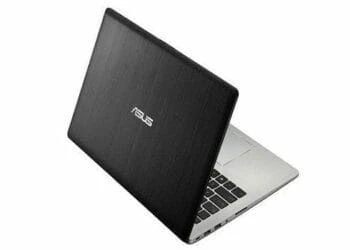
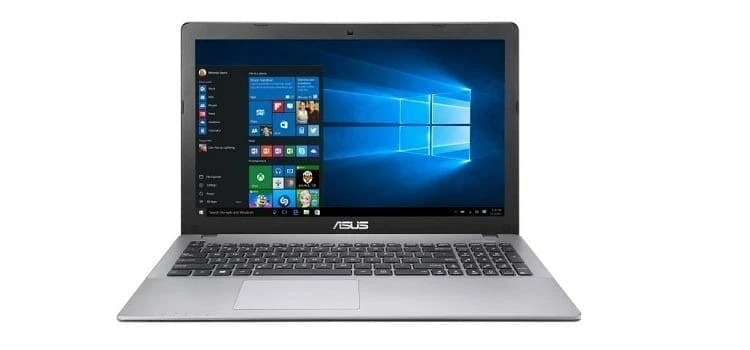
The ASUS X550ZA-WH11 is designed for your daily multitasking, and it is even ideal as an entertainment option for smart and practical users. Clad in a spun-circle finish and patterned palm rests, the latest in the ASUS X550ZA line adds a touch of elegance to everyday computing. It measures 1.20 by 15 by 9.9 inches (HWD) and weighs 5.1 pounds, which is similar to the previous model, though way heavier than most ultrabooks (but that is a different class altogether).
Nevertheless, it is lighter and slender than most desktop replacements. Its design and dimensions qualifies it as one of those laptops you can carry around once in a week stashed in a backpack, with the 4-cell battery providing enough juice for up to 4 hours before you can hook it up to a power source.
Display
In as much as the ASUS X550ZA-WH11 lacks touch screen feature, it comes with a 15.6-inch LED-backlit screen with a resolution of 1366 x 768 pixels, but we expected at least a full HD display thrown somewhere here. Nevertheless, the price makes it twisted to have Full HD, but you can find it on similarly priced systems such as the HP Pavilion Touchsmart 15, however you might make a few compromises on performance.
The screen doesn’t have great viewing angles. So if you take a look at it from the sides, the pictures are not as good. This is a common problem among the laptops in this price range but not a deal breaker.
Connectivity
Connectivity comes in way of 3 USB Ports: 2 are USB 3.0 compatible and 1 that is USB 2.0 compatible. It also features a HDMI output and a VGA port, so you can connect the laptop to bigger displays such as an HDTV for extended views. You can as well back up your files using the DVD Burner and it has a media reader, supporting various SD cards.
Wireless network is accessible in this device through 802.11 b/g/n Wi-Fi adapter and wired network via standard Gigabit Ethernet LAN port (RJ-45). Conspicuously missing is Bluetooth connection so you have to use an adapter such as the Kinivo Btd-400 Bluettoth Adapter if the need arises.
Storage
For storage, the device comes with a 1 TB HDD, at a maximum 5400RPM. This is a big plus to the ASUS X550ZA-WH11 as the space is big enough to store all your documents, alongside music, movies and even some less-demanding games. However, it runs a bit slower compared to SSD but you have the option to switch to SSD and get better performance.
The 5,400 rpm (rotations-per-minute) hard drive might not be the fastest as compared with the more speed-centric solid state drive (SSD) like the one we’ve seen in the Lenovo ThinkPad Edge E455, but it does offer enough storage space for your media collection and much more.
Performance
The ASUS X550ZA-WH11 is powered by AMD’s quad core A10-7400P 2.5GHz (Turbo up to 3.4GHz) processor, backed by 8GB RAM and 1TB (5400rpm) hard drive storage. This combination makes the notebook potent enough for everyday use, may it be word processing, web browsing and eve casual gaming. The 8GB memory sis upgradable to 16GB, but that may not be necessary considering that the base memory is more that sufficient for most applications that hardly require more than this memory.
However, if you’re planning on running some RAM-intensive tasks such as photo and video editing, music creation, and some decent gaming, you’ll have to look elsewhere, in that case, the Intel Core i5-powered ASUS Zenbook UX305LA is a recommendable option, and for gaming the Core i7-powered ASUS K501UX will suffice as the ideal system for some of the latest game titles.
The presence of AMD Radeon R6 graphics card gives the system some notch, and could have easily got a nod as our Editors’ Choice were it not for a few rough edges here and there. Still, the AMD Radeon R6 graphics card is a decent graphics card feature that allows moderate gaming and ensures smooth video performance for your laptop.
For higher resolution games and modern titles, you might have to look a bit higher and pay relatively more for gaming rigs such asASUS K501LX-EB71, which offers good gaming at a nice price, and if your budget allows discover the gaming power in more aggressive gaming rigs like the Alienware 15 or the Razor Blade (2015).
Verdict
Sometimes, a decent-looking, competent, and well priced is more preferable to, say, a flashier metal ultrabook, particularly if you’re on a budget or buying many for a small startup. The ASUS X550ZA-WH11 fits that description, thanks to decent battery life, a true Quad Core AMD A10-7400P processor, 8GB RAM and a roomier hard drive for your videos, photos and other documents.
Having said that, we can’t ignore the fact that such the slower hard drive is a glaring dent in the face of such a nice system, but it isn’t a deal breaker as such.
For that, if you can bear with the hard drive issue, then we don’t see any other reason to skip the ASUS WH11 as you shop around. Be it for office or home use, the ASUS X550ZA-WH11 has enough power to have the work done, and so does our Editors Choice the Toshiba Satellite C55-C5241.
The Review
ASUS X550ZA-WH11
The ASUS X550ZA-WH11 is budget desktop-replacement laptops that pack decent features such as a true Quad Core AMD A10-7400P processor, 8GB RAM, 1TB Storage and AMD Radeon R6 graphics at an affordable sticker price.
PROS
- Decent performance for the sticker price
- Decent performance for the sticker price
CONS
- A faster hard drive would be better
Review Breakdown
-
EDITORS RATING