
Pockeit
TRENDING
  • Home
  • Best Deals
  • Explore
  • Desktops
  • Laptops
  • Trending
  • Best Picks
  • Reviews
No Result
View All Result
  • Home
  • Deals
  • Reviews
  • Laptops
  • Desktops
  • Monitors
  • Phones
  • TVS
  • Best Picks
  • More
    • Appliances
    • Explore
    • How-To
    • Network
    • Printers
    • Soundbars
    • Trending
  • Home
  • Deals
  • Reviews
  • Laptops
  • Desktops
  • Monitors
  • Phones
  • TVS
  • Best Picks
  • More
    • Appliances
    • Explore
    • How-To
    • Network
    • Printers
    • Soundbars
    • Trending
No Result
View All Result
Pockeit
No Result
View All Result
Home Reviews Laptops Budget Laptops

Chuwi Hi10 Ultrabook Tablet PC Review

by
January 22, 2024
in Budget Laptops
Chuwi Hi10

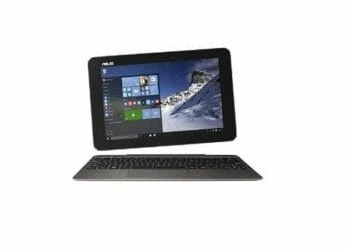
The Chuwi Hi10 Ultrabook, a Windows 10 slate that shapes up the ‘status quo by making available -to users on a budget- a functional tablet affordably. Since the HP Chromebook 14a was released, many have been locked out by the price, but the Chuwi company has toned down the pricing for an almost similar experience. Yes, the keyword here is ALMOST similar…not similar since the Microsoft Surface 3 does score well on most fronts.

Not so long ago, sourcing your consumer electronics straight from China was near impossible. You had to close your fingers, and hope that the unit will work out of the box. Not anymore. For the past two or so years, a new crop of Chinese retailers has revamped the entire buying experience. Now you have many Chinese players having their presence felt by shipping usable and affordable consumer electronics worldwide for free.

Design

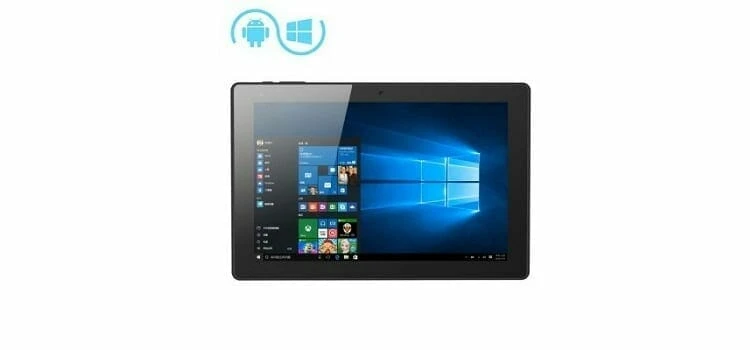
As expected, budget consumer electronics come with a few compromises here and there. The Hi10 sports a 100% plastic body, safe for the glass touch area. The plastic doesn’t necessarily shout ‘cheap’ but it does downgrade the solid feel of an otherwise perfect tablet.

The backside is clad in textured plastic that is prone to fingerprints and smudges over long-term use. Ideally, if Chuwi would have adopted a metallic construction we’d have seen the price soar upwards, thus the plastic construction isn’t much of a deal-breaker here…is it?
Chuwi Hi10

Performance

Powering the Chuwi Hi10 is Intel’s latest 1.44GHz Cherry Trail Z8300, it’s a quad-core CPU that can clock up to 1.84GHz. The Z8300 happens to be at the bottom of Cherry Trail Chips, but it does deliver decent speeds just like the older Bay Trail Z3735F. However, it gets a push over its older competitor in graphics performance as it supports some current features like 4K resolutions rendered at 30 frames per second (FPS) for HDMI out, USB 3.0 support, and relatively high-speed MicroSD card slots. So, if you have some files to watch on HD, you’re partly sorted.

To that, add 4GB memory on a single channel LPDDR3 slot, which apart from being not-so-good can still have the work done, allow you to play games, and open multiple browsers tabs on both Windows 10 and Android platforms. Performance on Windows 10 is at par with most Cherry Trail Z8300 machines, and the Android 5.1 experience is also worthwhile.

The Hi10’s 10.1-inch screen supports a maximum resolution of 1920-by-1200 pixels, which appears to be more of a square. The screen is sharp and bright, making one of the key features of the tablet considering that it has a PPI of 224 which serves to conceal individual pixels. This does not, however, qualify as a ‘retina’ since Apple calls any screen with 264 PPI and above as a Retina Screen. For storage, you have a Hynix HCG8e 64GB eMMC, but if you need more you have an SD card slot supporting up to 128GB.

Other Features

 It is not always that you find not, one, but two full-sized USB ports on a tablet. On the Hi10 you have one USB 2.0 port, one USB 3.0 port; plus, another USB 2.0 port and MicroUSB port on the dock, making it a total of 4 ports. Connectivity comes in way of 802.11b/g/n Wi-Fi and Bluetooth 4.0. It also features both front and back cameras, each 2.0 MP; which is not-so-great but suffices for the basic users who want to have a random Skype chat.

 The Chuwi Hi10 comes with an 8000 mAh battery, which is designed with some endurance for a basic user. During our tests, we managed to get 6 hours 47 minutes, which is quite good considering that it sports a bright, screen with a 1920-by-1200 resolution. If you need to prolong the juice, toning down the brightness and switching the system to airplane might allow you to watch an HD movie for even up to 7.5-8 hours.

Verdict

The Chuwi Hi10 Ultrabook Tablet PC might not be the most powerful slate tablet we’ve seen in the recent past, but it does appeal to a wider category of users. Budget buyers. It is affordably priced, but for the price, you get an array of premium features: USB 3.0 port, faster MicroSD slot, HDMI support for up to 4K, and a beefier screen. That said, if you’re in the market for an affordable Windows 10 tablet that won’t look odd on your hands, then the Chuwi Hi10 is worth a long look as you shop around.

The Review

Chuwi Hi10

3.5 Score

The Chuwi Hi10 Ultrabook Tablet PC might not be the most powerful slate tablet we’ve seen in the recent past, but it does appeal to a wider category of users. Budget buyers.

PROS

  • Speedy processor
  • Generous memory and storage
  • Full HD display

CONS

  • Poor speaker placement

Review Breakdown

  • EDITORS RATING

Related Posts

The Hp 15-r137wm strikes a delicate balance between, design, mobility, performance and productivity. The mid-range priced Notebook comes in a regal purple color designed for students, office use and home based users with the energy to handle all your tasks with ease. It comes fully loaded with a dual core Intel Core i3-4005U clocked at 1.7 GHz, integrated video card Intel HD Graphics 4400, 6 GB of RAM, HDD with a total of 500 GB and Wi-Fi-card with support N-standard on the board. In the battery mode notebook HP 15-r137wm TouchSmart can run up to 5 hours. Lets see how it stacks up the competitive mid range laptop category. First things first, unless you're looking for a touch-enabled laptop, for upto $100 less you can get powerful laptops. For instance, our Editors Choice- Toshiba Satellite C55-C5241 goes for $110 less but comes with Intel Core i5 and Windows 10 preinstalled, and so is the ASUS F555LA-AB31, with its Intel Core i3 processor and premium design. The system comes with Windows 8.1 but offers free upgrade to windows 10 that seems to work smoother for the ultimate all new experience. With an intuitive touchscreen and a sleek, lightweight design, this computer allows you to enjoy true reliability at home or on the road with a simple, yet powerful value-packed notebook that accomplishes all the tasks and gives an intuitive Win8/10 experience. Design The HP measures 10.20 x 14.88 x 1 inch and comes with a 15.6" diagonal HD WLED - backlit touchscreen display and 1366x768 resolution that allows you to watch all your movies and view photos in a clarity typical to entry level laptops. The speakers are backed up with Beats Audio technology that lets you enjoy a superb sound when it comes to entertainment. If you are in need of a laptop that doesn’t cost too much but works with all common applications and programs, then the HP 15-r137wm deserves a closer look. It comes with HD webcam and inbuilt SuperMulti DVD burner which burns both CD and DVD. Network connectivity is supported by 802.11 b/g/n Wi-Fi and Fast Ethernet. Conspicuously missing on this laptop is Bluetooth connectivity, however you can purchase an adaptor to enjoy this services. The 15.6” LED backlit touch display offers native resolution of 1366 X 768 pixels resolution that can only support 720p playback. In case you need to watch 1080p content on the laptop, you will have to use an external display through the HDMI or a compatible TV. Connectivity The Hp 15-r137wm offers ports and connectivity features that are not outstanding, however we did not expect much at this price. It comes with Multi-format digital media card reader for Secure Digital cards, 1 USB 3.0, 2 USB 2.0 for connection of more accessories and peripherals,, 1 HDMI output for broadcasting media on larger screens, 1 RJ-45 (LAN) and 1 Headphone-out/microphone-in combo jack. Performance The Hp 15-r137wm is powered by Intel core i3-4005u processor which operates with base frequency of 1.7GHz and has two cores that can handle atleast or more demanding productivity and daily multimedia tasks at the same time without any lags. The processor is hyper threading enabled, thus two cores can handle four threads at a time. The 6GB DDR3 SDRAM system memory grants you the power to handle most power-hungry applications and tons of multimedia work with a lot of ease. The 500GB 5400rpm speed SATA Hard drive is sufficient enough at this price of sub-$600 for storage of your documents, movies and music. The laptop comes with Intel HD 4400 graphics which supports low end gaming. You can play Sims 4, Wow and Dota 2 in low to medium details and settings but can’t play Titanfall, Thief, watch Dogs, Risen 3 among others but the ASUS VivoBook S400CA promises to shell all your performance problems with an Intel Core i5 processing power. Summary The Hp 15-r137wm offers strong performance with a pretty look for day to day tasks like running Microsoft Office, web browsing with multiple tabs, listening to music, watching videos on screen or on an external display. It also supports entry level photo and video editing. The new Windows 10 has a more user friendly interface than the Windows 8 and some new features you would enjoy. If you are not obsessive about specific color, you can take a look at Acer Aspire E5-571P-31LT which is a touchscreen laptop with 4GB memory and 500GB hard drive and comes with slightly better processor.
Budget Laptops

HP 15-R137wm Touchsmart Review

Toshiba CB35-B3340
College Laptops

Toshiba Chromebook 2 (CB35-C3300) Review

Lenovo Flex 3
Budget Laptops

Lenovo Flex 3 Review

Asus Chromebook Flip C100
Budget Laptops

Asus Chromebook Flip C100 Review

Acer Chromebook CB3-111-C670 Review
College Laptops

Acer Chromebook CB3-111-C670 Review

ASUS Transformer Book T100HA-C4-GR Review
Budget Laptops

ASUS Transformer Book T100HA-C4-GR Review

Pockeit

© 2026 Pockeit

Upgrade your digital lifestyle

  • Privacy Policy
  • About us
  • Contact US
  • Disclosures

Follow Us

No Result
View All Result
  • Home
  • Deals
  • Reviews
  • Laptops
  • Desktops
  • Monitors
  • Phones
  • TVS
  • Best Picks
  • More
    • Appliances
    • Explore
    • How-To
    • Network
    • Printers
    • Soundbars
    • Trending

© 2026 Pockeit